Description:
This article explains how to change the default remote control solution (e.g., from Zoho Assist to Splashtop) in your WizyEMM instance. This is useful when a company previously used another remote control tool but now prefers to use a different one for device management.
Troubleshooting / Steps:
Problem:
When accessing the Remote Control option in the console, it either:
Still shows the previous remote control tool (e.g., Zoho) instead of the new one (e.g., Splashtop), or
The Remote Control option is not yet enabled for the instance.
Resolution:
To enable or update the default remote control tool for the company instance:
Go to the Partner Console.
In the search bar, enter the company name or locate it from the list.
Select the company to open its management page.
Navigate to the Settings tab.
Go to Features.
Under Remote Control Mode, choose the preferred remote control option:
Splashtop
Zoho
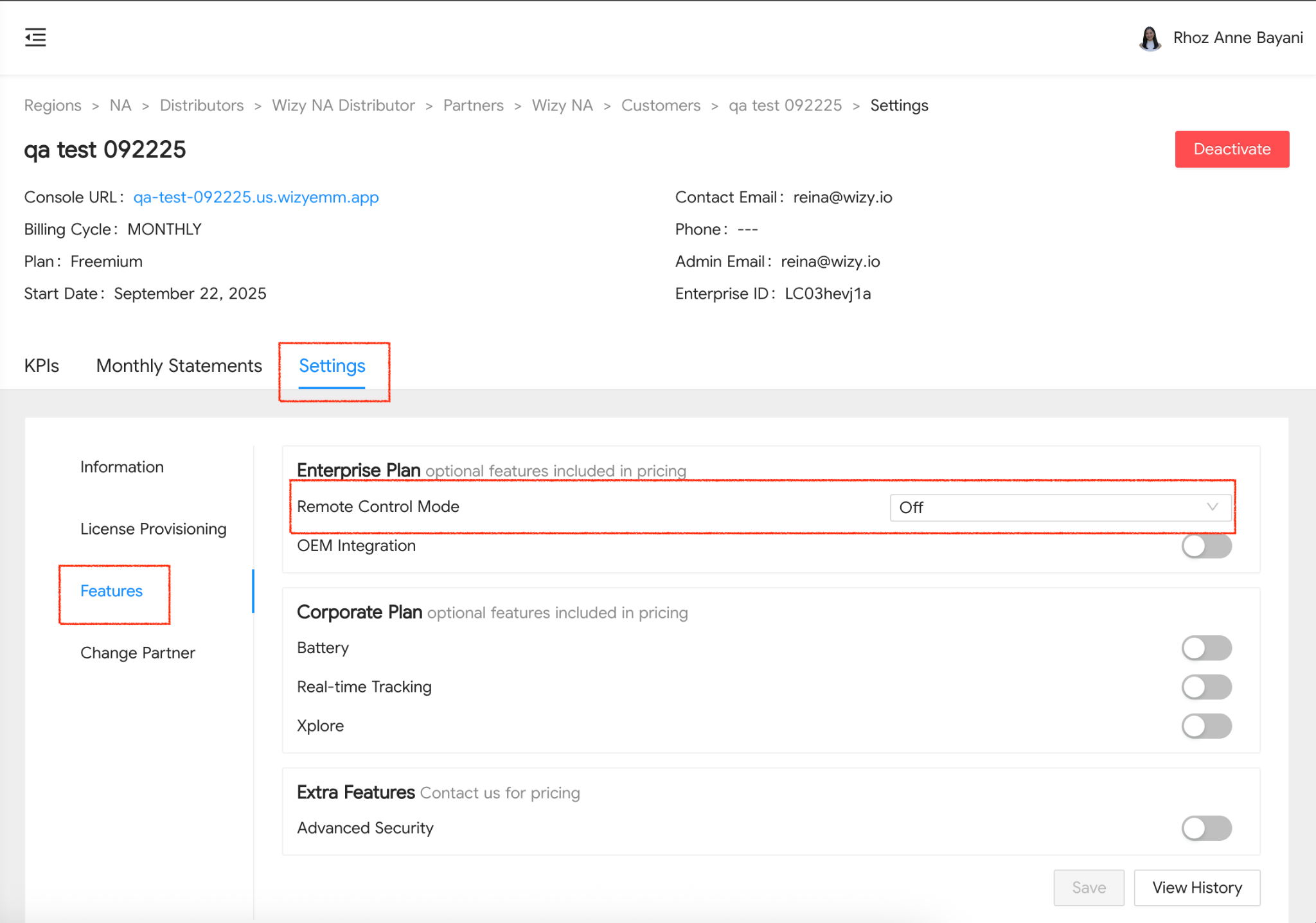

Click Save to apply the changes.
Was this article helpful?
That’s Great!
Thank you for your feedback
Sorry! We couldn't be helpful
Thank you for your feedback
Feedback sent
We appreciate your effort and will try to fix the article